Simple automation for recurring reports
Connect each report once, import it manually when needed, or schedule recurring updates.
Report Delivery Email
Each connected report receives a dedicated Huddle Sync Report Delivery Email for receiving recurring Excel files.
Scheduled automation
Run imports hourly, daily, weekly, bi-weekly, or monthly without repetitive manual work.
Append, replace, or create
Replace existing data, append new rows, or create a new destination tab for each import.
Multiple report connections
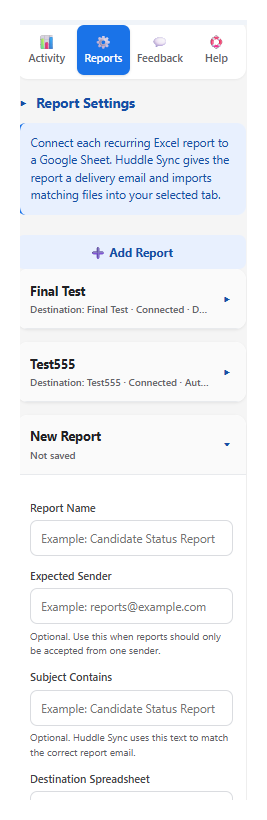
Configure multiple reports with separate destinations, matching rules, import modes, and schedules.
Formatting options
Preserve the existing Google Sheets™ layout, copy available Excel formatting, or import report values only.
Import activity
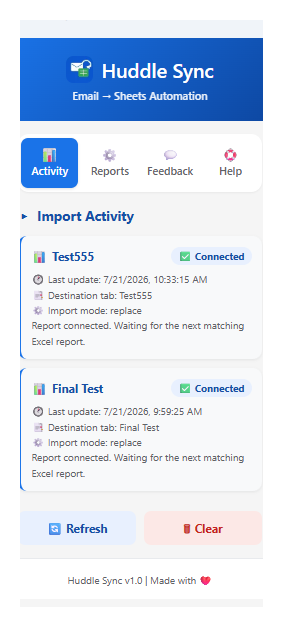
Review connection status, file name, destination tab, import mode, row count, completion details, and errors.
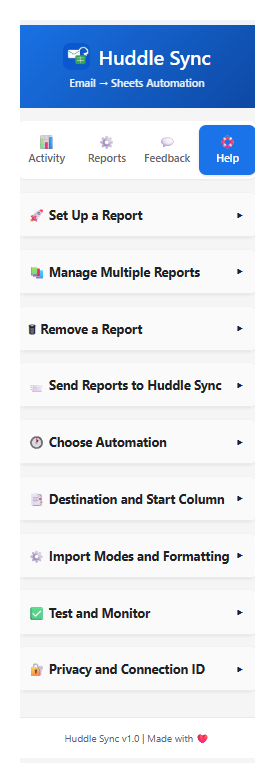
See Huddle Sync in action
Real interface views from the Google Sheets™ add-on.
Built for everyday teams
Huddle Sync is designed for teams that regularly receive Excel reports and need the data available in Google Sheets™.
🏫 Schools
Enrollment exports, hiring reports, staffing lists, and recurring administrative reports.
👥 HR teams
Candidate reports, onboarding spreadsheets, staffing files, and recurring people-operations reports.
🏢 Operations
Vendor reports, partner exports, service files, and recurring operational workflows.
💼 Sales & RevOps
Lead lists, pipeline exports, booking reports, and recurring CRM files.
📣 Marketing
Campaign exports, partner files, and recurring performance reports.
💰 Finance
Invoices, payroll summaries, reconciliations, and recurring financial reports.
Plans that grow with your reporting needs
Start with the Free plan today. Pro is coming soon, and custom Enterprise solutions are available for organizations.
Free
For individuals and small teams automating recurring Excel report imports.
- Up to 2 report connections
- Up to 100 imports per month for each report connection
- Run imports anytime or schedule automatic imports
- Replace existing data, append new rows, or create a new worksheet
- Preserve existing Google Sheets™ formatting or import available Excel formatting
- Prevent duplicate headers when appending report data
- Import activity and connection status
- Built-in help and support
Pro
For users who want more from Huddle Sync.
- Everything included in Free
- New automation, workflow, and AI tools
Have an idea or a feature you’d like to see? Tell us what would make Huddle Sync more useful for you.
Custom
For reporting needs that go beyond our standard plans.
- Everything included in available plans
- Fully customizable Huddle Sync solutions
- Dedicated automation, workflow, and integration options
- Solutions designed around your specific requirements
Tell us what you're trying to accomplish, and we'll explore a practical, up-to-date Huddle Sync solution that fits your workflow, available tools, and budget.
Free plan limits apply per account and reset monthly. Pro features and pricing may change before launch. Enterprise availability is based on organization requirements and implementation scope.
Ready to stop copying reports by hand?
Install Huddle Sync from the Google Workspace Marketplace™, create your first report connection, and start importing recurring Excel reports directly into Google Sheets™.
Install from Google Workspace Marketplace™FAQ
Quick answers before you install.
How does Huddle Sync receive my reports?
Each connected report is assigned a dedicated Huddle Sync Report Delivery Email. Send the recurring Excel report to that address, and Huddle Sync routes it to the report connection you configured.
Does Huddle Sync access my Gmail™ inbox?
No. Huddle Sync does not access, read, search, or monitor your Gmail™ inbox. It processes only reports delivered to the Huddle Sync Report Delivery Email assigned to your report connection.
Why does Huddle Sync need Google Drive™ access?
Huddle Sync uses Google Drive™ access only for files created, selected, or used with the app. This may include temporarily converting an Excel report into a format that can be imported into Google Sheets™.
Why does Huddle Sync need Google Sheets™ access?
Huddle Sync needs Google Sheets™ access to identify available destination tabs and write imported Excel data into the spreadsheet and tab selected by the user.
Why does Huddle Sync connect to an external service?
The add-on communicates with the Huddle Sync backend to create report connections, retrieve delivered reports, display connection status, and confirm completed imports.
Does Huddle Sync sell or share my Google user data?
No. Huddle Sync does not sell, rent, or trade Google user data and does not share it with third parties for advertising or unrelated marketing purposes.
What happens to the Excel attachment after import?
The attachment is processed only to complete the requested import. After a successful import is confirmed, the source report and temporary processing files may be removed according to the Huddle Sync processing workflow.
What file types are supported?
The launch version focuses on Excel files using the .xlsx format.
Can I connect multiple reports?
Yes. You can configure multiple reports with different destinations, tabs, import modes, sender or subject rules, and automation schedules.
Which import modes are available?
You can replace existing data, append report rows to the bottom of a tab, or create a new destination tab.
Can I run imports immediately?
Yes. You can import an individual report or import all configured reports manually, even when automation is also enabled.
Is Huddle Sync free?
Yes. The Free plan includes up to two report connections and up to 100 imports per month for each connection. Pro is coming soon, and custom Enterprise solutions are available by contacting us.
Support and donations
Huddle Sync is free at launch. Optional support helps keep it maintained and improved.
Send feedback or request help
Use the form for bugs, feature requests, privacy questions, deletion assistance, or general support.
Support the project
Optional support helps keep the product maintained, improved, and available to early users.